01 / 27
or Space to navigate
wifi-ops@quito ~ %
$ sudo wifi-upgrade --office=quito --verbose

How to Fix
Your Wi-Fi

A deep dive into diagnosing and rebuilding office wireless — the Quito story

Stay tuned until the end, there will be a surprise for you!

signal: strong band: 6ghz latency: 4ms
~/problem
$ cat /var/log/complaints.log

The Problem

  • People were complaining about the Wi-Fi at the Quito office
  • Slow speeds, constant disconnections, unreliable video calls
  • Some people had given up and used mobile data
  • The gaming crew couldn't play Smash Bros at lunch anymore
// mission
Diagnose, redesign, and deploy enterprise-grade Wi-Fi — without enterprise-grade budget.
## /var/log/wifi/complaints.log
[09:14] ERR wlan0: deauthentication reason=3
[09:15] WARN signal: -82 dBm (weak)
[09:17] ERR DHCP timeout on aruba-02
[09:21] WARN channel 6: 14 competing APs
[09:23] ERR client roamed to netlife-modem
[09:24] ERR packet loss: 34%
[09:30] WARN zoom: "you're on mute" x47
[12:01] CRIT smash_bros: NAT traversal failed
[12:02] ERR aruba-01: firmware EOL
~/basics/emr
$ man wifi

How Wi-Fi Works

  • Wi-Fi is just electromagnetic radiation — photons, same as visible light
  • Your device emits and receives EMR at specific frequencies (2.4 / 5 / 6 GHz)
  • Multiple devices = conflicts. They must choose channels (sub-frequencies)
  • Anything can cause interference: walls, microwaves, humans, other APs
  • Wi-Fi radiation is non-ionizing — it's not harmful. Don't worry.
EM SPECTRUM LOW f HIGH f RADIO 3kHz–300GHz NON-IONIZING (SAFE) MICRO WAVES oven = 2.45GHz! INFRA RED heat remotes VISIBLE ⚠ IONIZING (HARMFUL) ULTRAVIOLET X-RAYS GAMMA RAYS Wi-Fi Lives Here 2.4 GHz 5 GHz 6 GHz crowded · · · · · · · · · · · · · · less interference // same physics as light — just a different frequency
~/basics/channels
$ iwlist wlan0 channel

Channels & Overlap

  • Channels are sub-bands within a frequency
  • 2.4 GHz has only 3 non-overlapping channels: 1, 6, 11
  • Overlapping channels = interference hell
  • Protocols detect collisions and retransmit packets
2.4 GHz CHANNEL MAP 802.11 b/g/n/ax/be — 11 channels, only 3 don't overlap Ch 5 · 2432 Ch 10 · 2457 Ch 4 · 2427 Ch 9 · 2452 Ch 3 · 2422 Ch 8 · 2447 Ch 2 · 2417 Ch 7 · 2442 Ch 1 · 2412 Ch 6 · 2437 Ch 11 · 2462 2401 2410 2420 2430 2440 2450 2460 2470 frequency (MHz) non-overlapping (use these) overlapping (avoid)
> only channels 1, 6, 11 don't interfere with each other
~/basics/channels-5ghz
$ iw phy0 channels | grep "5 GHz"

5 GHz Channel Map

25 non-overlapping channels across 4 UNII bands. DFS channels require radar detection.

5150 5250 5350 5470 5725 5850 frequency (MHz) UNII-1 non-DFS 36 40 44 48 80 MHz UNII-2 DFS ⚡ 52 56 60 64 80 MHz 160 MHz NO CHANNELS 5350–5470 MHz UNII-2C (Extended) DFS ⚡ — 12 channels 100-112 116-128 132-144 80 80 80 160 MHz UNII-3 non-DFS 149 153 157 161 165 80 MHz Non-DFS (always available) DFS (radar detection required) Channel bonding width 25 channels at 20 MHz · 6 at 80 MHz · 2 at 160 MHz · 0 overlap // DFS channels may be unavailable if radar is detected nearby (airports, military)
~/basics/channels-6ghz
$ iw phy0 channels | grep "6 GHz"

6 GHz Channel Map

1200 MHz of clean spectrum. No DFS, no overlap, no legacy devices. WiFi 6E/7 only.

5925 6425 6525 6875 7125 frequency (MHz) — 1200 MHz total UNII-5 500 MHz · 25 channels · indoor + outdoor (AFC) Ch 1–13 Ch 17–29 Ch 33–45 Ch 49–61 65–93 UNII-6 100 MHz indoor 97–113 UNII-7 350 MHz · 18 channels · indoor + outdoor (AFC) 117–129 133–145 149–185 UNII-8 250 MHz · 11 ch · indoor only 189–213 217–233 Channel widths: 80 MHz × 14 160 MHz × 7 320 MHz (WiFi 7 only) × 3 Indoor + Outdoor (AFC) Indoor / Very Low Power only 2.4 GHz: 3 usable channels · 5 GHz: 25 channels · 6 GHz: 59 channels · no DFS · no legacy · no interference // this is why we moved to 6 GHz — it's a completely clean highway
~/basics/duplex
$ ethtool eth0 | grep Duplex

Why Cables Are Better

  • Wi-Fi is half-duplex — can't send and receive at the same time
  • Exception: WiFi 7 MLO (Multi-Link Operation) — multiple bands simultaneously
  • Ethernet cables are full-duplex — simultaneous TX and RX
  • Cables can have interference too, but far less susceptible than wireless
  • This is why Franco always says: "use a cable if you have problems"
// fun fact
Fiber optic is immune to electromagnetic interference — it uses light in glass, not electrons in copper.
ETHERNET full-duplex TX ↔ RX simultaneous latency: ~0.1ms packet loss: ~0% vs WI-FI half-duplex TX or RX (not both) latency: 2-10ms packet loss: varies // if you can plug in, always plug in
~/diagnosis
$ grep -r "ERROR" /var/log/wifi/

Root Causes

  • Old Aruba APs — discontinued, no support, likely zero-day exploits
  • Arubas were interfering with each other, even on 5 GHz. At one point we had to turn one off so the other would work
  • 2.4 GHz chaos — massive interference from neighboring networks
  • Netlife modem trap — same SSID + password as our APs, users unknowingly connected to it, bypassing load balancer
  • No way to disable Netlife's built-in Wi-Fi — we don't own the modem
ARUBA #1 EOL / no patches ioet-staff interference! ARUBA #2 EOL / no patches ioet-staff NETLIFE MODEM Huawei · no admin access ioet-staff !! users connect here without knowing ↓
aruba-01: offline aruba-02: degraded netlife-modem: rogue
~/analysis/survey
$ wifiman --survey quito-office/

Wi-Fi Survey with WiFiMan

  • WiFiMan — free app by Ubiquiti, no ads, no subscriptions
  • AR mode overlays signal data on real-world view. Works better on Android than iOS
  • Can't hold the AP with your hand while scanning — your body blocks the signal and ruins measurements
  • Small repositioning = huge impact on coverage
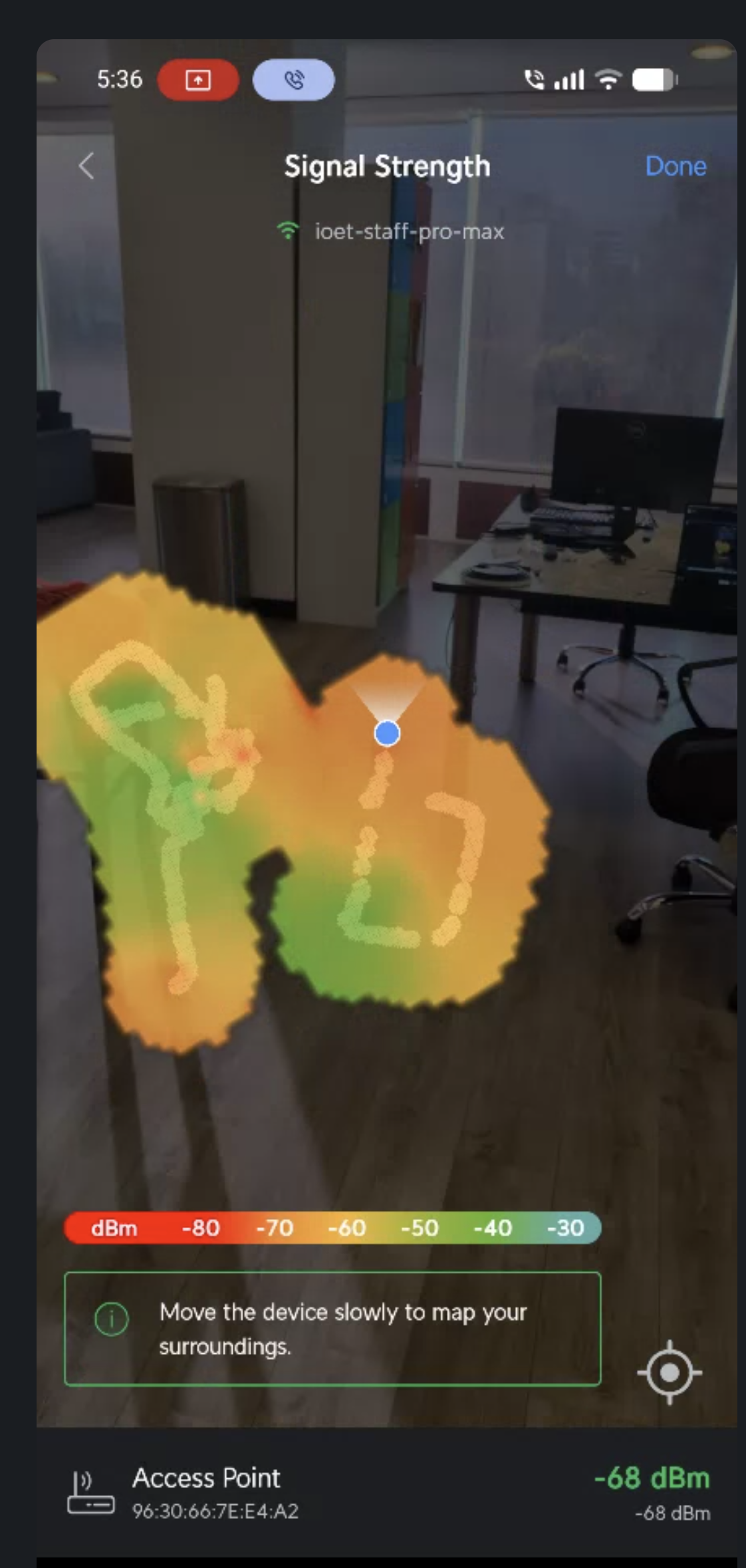
WiFiMan AR signal strength scan showing heatmap overlay on real office
> WiFiMan AR signal scan — green/yellow = strong, red = weak
~/demo
$ wifiman --live

DEMO

~/analysis/heatmaps

AP Placement Scenarios

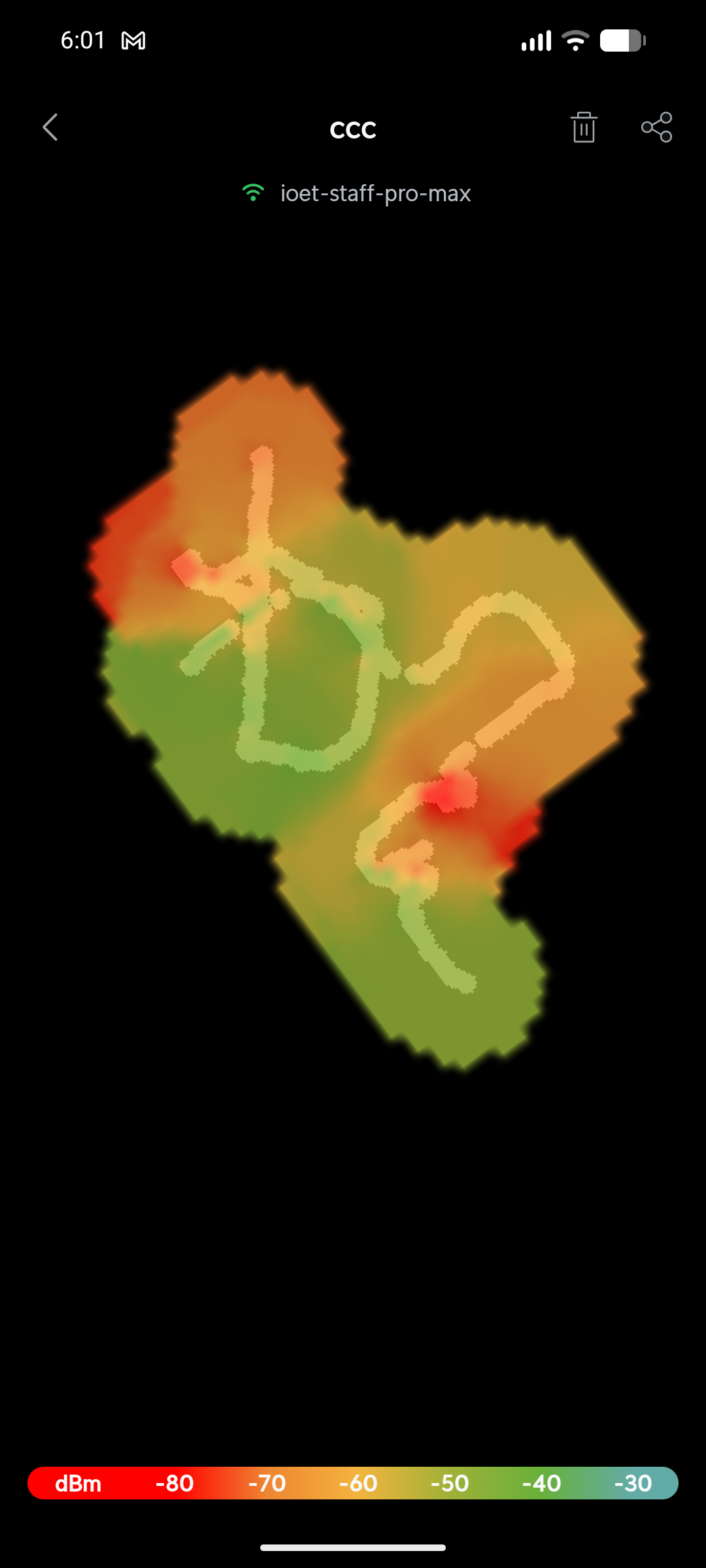
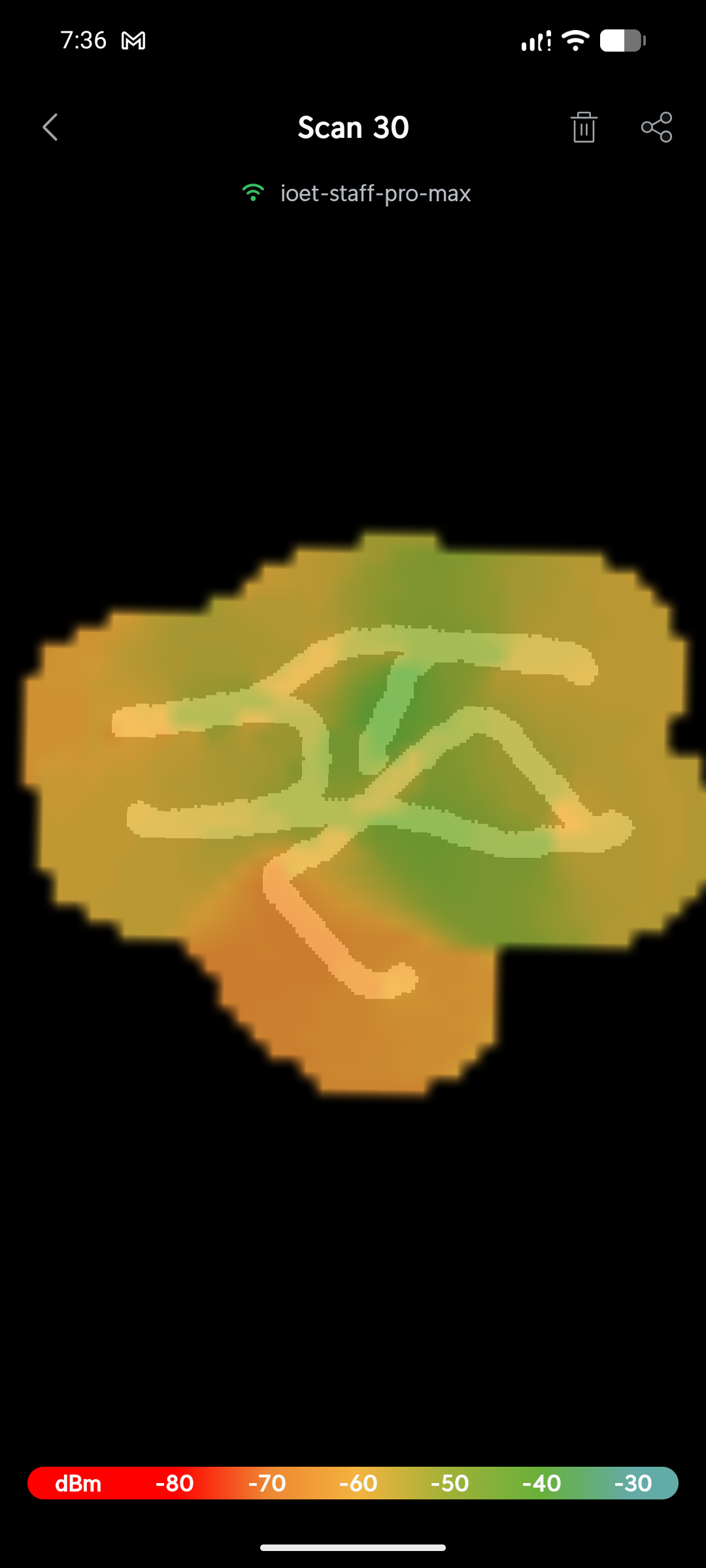
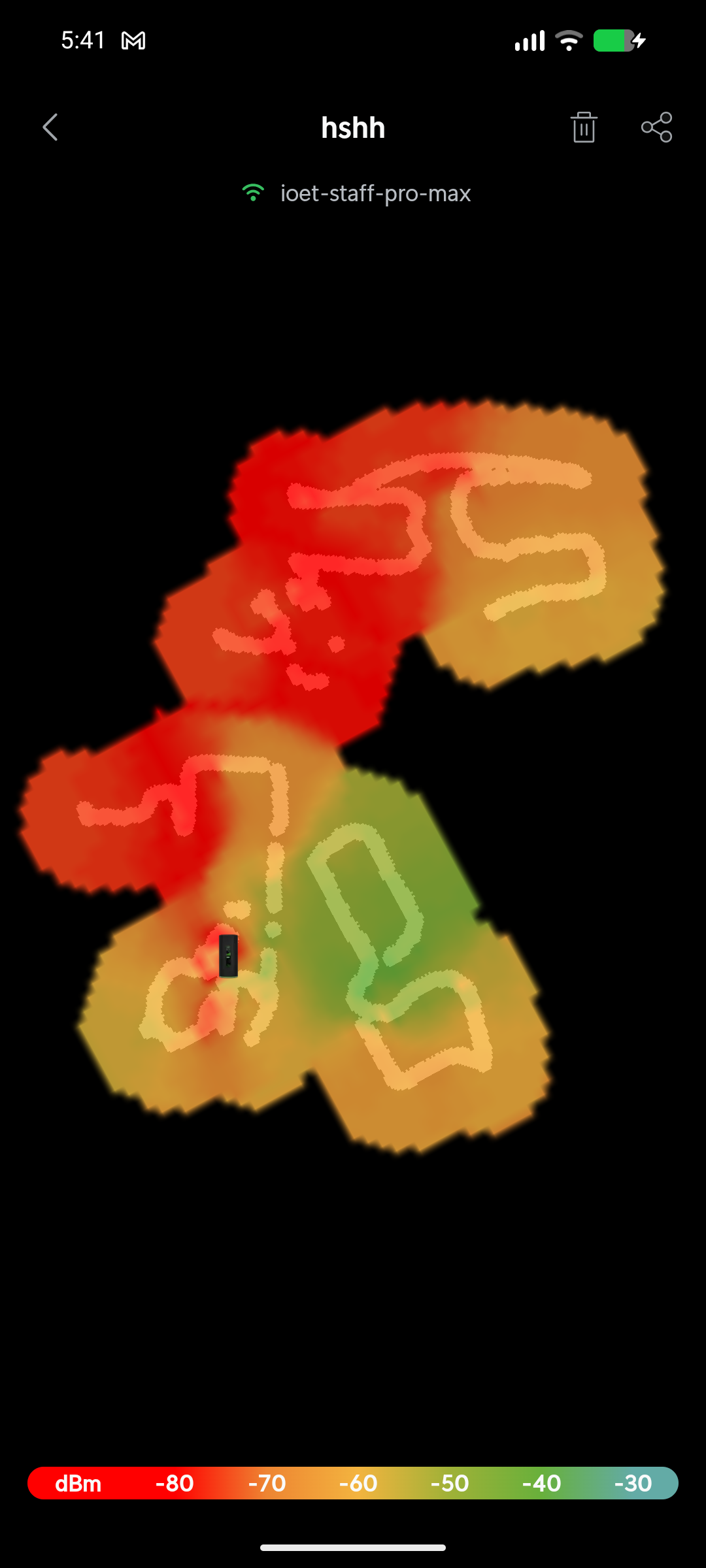
Three different AP placements tested. Small changes in position → dramatically different coverage maps.

Scenario A - AP placement with weak spots
Scenario A
Scenario B - different AP position
Scenario B
Scenario C - another AP position
Scenario C
~/installation/day-one

Installation Day

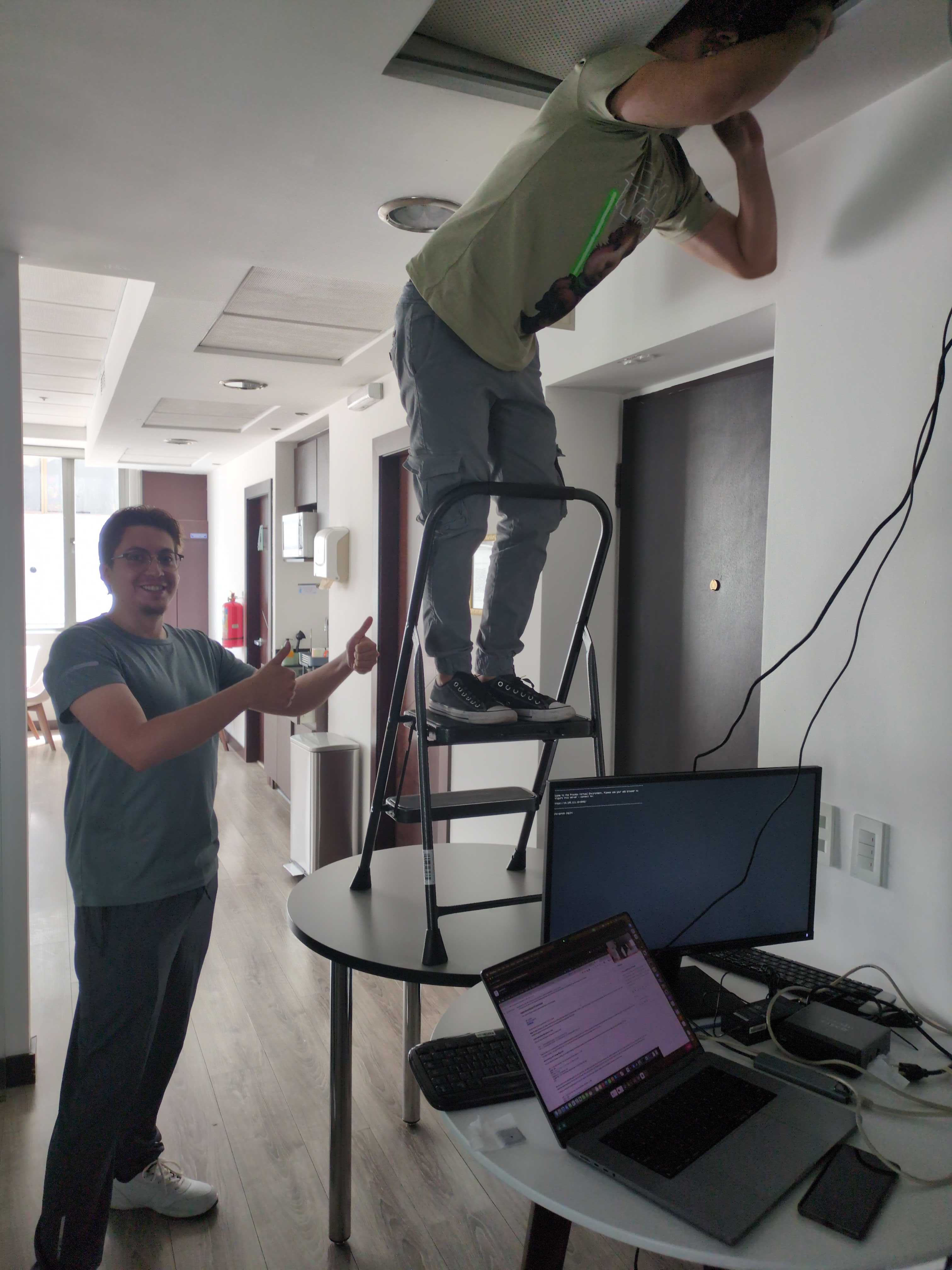
Optimal placement confirmed — time to mount the new UniFi APs.

Team installing access point on ceiling
mounting_in_progress.jpg
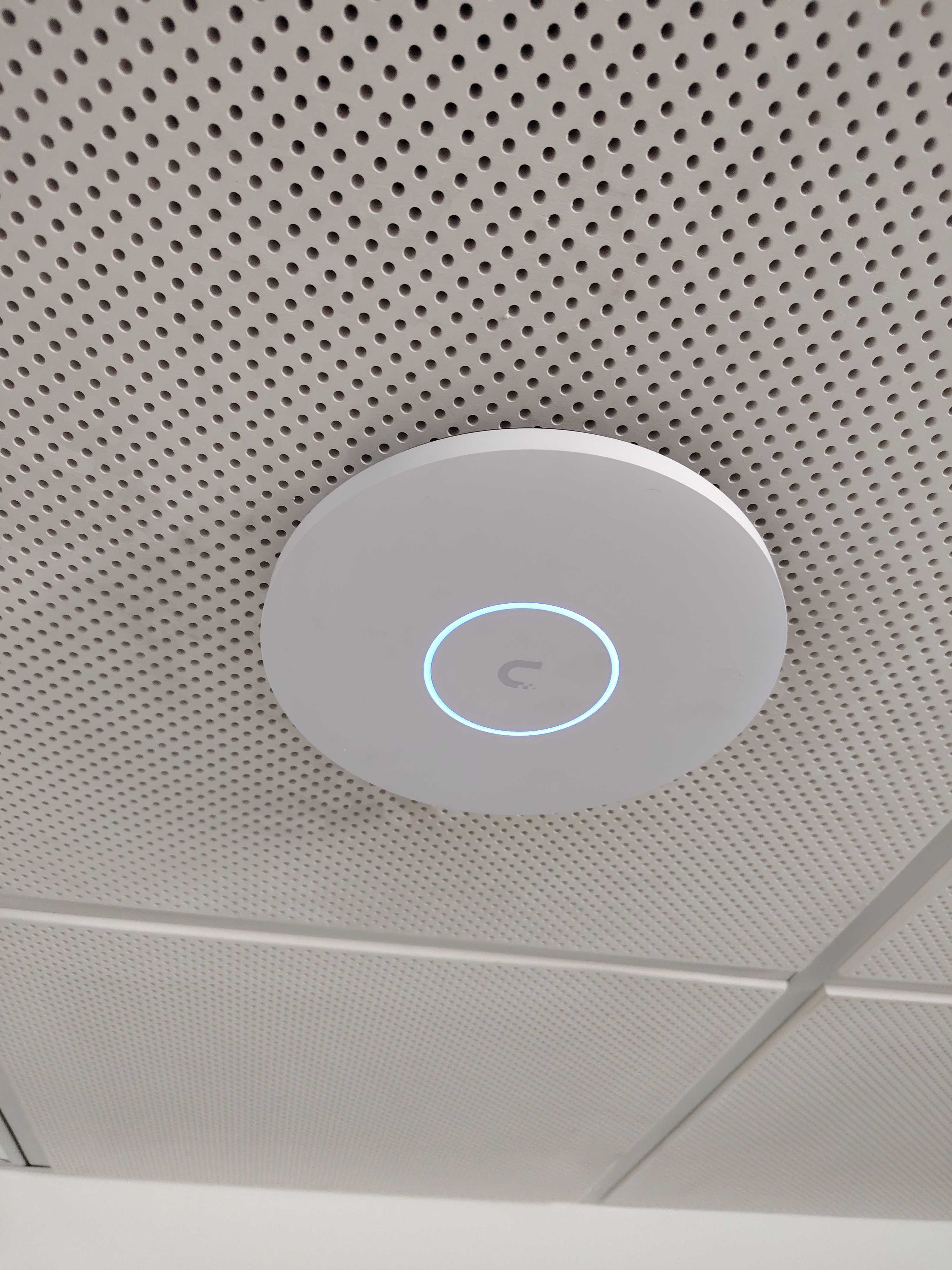
UniFi access point mounted on ceiling ~22 cm ceiling mount ~5 cm
unifi_u7_pro_mounted.jpg
~/installation/lessons-learned

Lessons Learned

What we figured out after the initial setup.

  • $ Configure and survey one AP at a time — disable the others to get clean measurements
  • $ Find the maximum transmitting power for each AP so roaming works correctly
  • $ Run a separate Wi-Fi survey for each frequency band — 2.4, 5, and 6 GHz behave very differently
  • $ Collect interference & channel usage metrics before choosing your channels
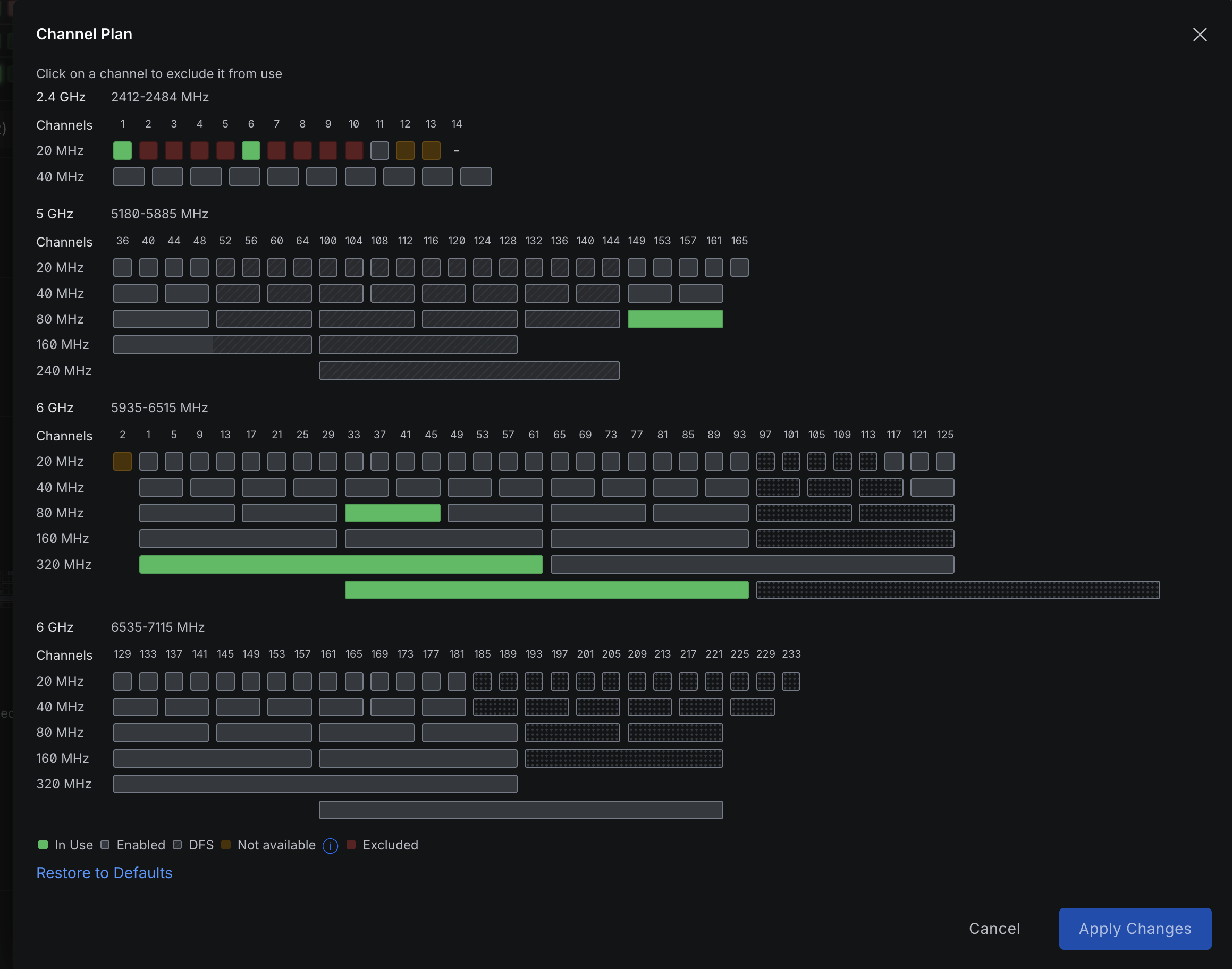
  • $ "Automatic" isn't always best — we preferred configuring channels manually for full control
UniFi Channel Plan — channel selection across 2.4, 5, and 6 GHz bands
unifi_channel_plan.png
~/tips/general

General Wi-Fi & Networking Tips

~/myths/router

Your "Router" Is Actually 5 Devices

That box from your ISP does way too many things at once.

"Home Router" ACCESS POINT Wi-Fi radio SWITCH LAN ports FIREWALL NAT + rules ROUTER Packet forwarding DNS / DHCP Names + IPs
~/myths/busted

Wi-Fi Myths: Busted

"More Mbps = better internet"Latency and resource locality matter just as much
"More access points = better coverage"They interfere with each other. 2 well-placed APs > 5 random ones
"Just buy a Wi-Fi repeater"Repeaters halve bandwidth and add latency. Terrible idea.
"Wi-Fi radiation is dangerous"It's non-ionizing. Same as visible light, just a different frequency.
"My password is wrong"PSK handshake can fail for other reasons — it's not always the password.
"Bigger antennas = better Wi-Fi"Larger antennas don't mean more coverage or a better experience. Placement and configuration matter far more.
~/specs/bands

2.4 vs 5 vs 6 GHz

Property 2.4 GHz 5 GHz 6 GHz
Range Long ~45m Medium ~25m Short ~15m
Speed Slow ~150 Mbps Fast ~1 Gbps Fastest ~2+ Gbps
Interference Very high Medium Very low
Channels 3 non-overlapping 25 non-overlapping 59 non-overlapping
Wall penetration Good Fair Poor
Standard WiFi 4 (802.11n) WiFi 5/6 (ac/ax) WiFi 6E/7 (ax/be)
// our choice
5 GHz + 6 GHz — no neighbor interference, fast enough for everyone, office is small enough for the range.
~/specs/wifi7
$ iw phy0 info | grep MLO

WiFi 7 & MLO

// how signals work
Data is encoded by modulating the frequency and phase of radio waves. More antennas = more simultaneous data streams = more throughput.
~/gaming/nat

Why Smash Bros Fails at the Office

P2P games need Open NAT. Our strict firewall rules and lack of IPv6 make that impossible.

NAT Type: OPEN Direct P2P connections work NAT Type: MODERATE Some P2P works, some fails NAT Type: STRICT P2P blocked completely OUR OFFICE: Console OPNsense (NAT) Strict firewall rules Internet No IPv6 Result: Strict NAT -- P2P games like Smash Bros can't establish connections Not the game's fault! Strict firewall rules block P2P traffic, and no IPv6 limits NAT traversal.
~/solution
$ systemctl start wifi-upgrade.service

The Solution

New hardware, better placement, zero subscriptions.

02
~/solution/hardware

New Hardware Stack

2x UniFi Access Points

WiFi 6E/7, 4x4 MIMO, POE powered. Placed optimally after WiFiMan survey.

UniFi Network Switch

10 Gbps backbone, POE for APs, SFP uplink. Room to grow.

Qotom Server (Proxmox)

Runs OPNsense VM for routing, firewall, load balancing. Connected via SFP.

EcoFlow Power Station

Backup power for the entire network stack. No more outages during blackouts.

OPNsense (Virtual)

Load balancing Netlife + Starlink, VLANs, guest network, DNS, firewall rules.

Dual WAN: Netlife + Starlink

Primary + failover. Load balanced. Looking for a 3rd provider.

~/solution/topology

Network Topology

Netlife Starlink LOAD BALANCED Qotom Server Proxmox + OPNsense VM SFP (fiber) UniFi Switch (10G) POE++ POE++ UniFi AP #1 UniFi AP #2 Cisco SW #1 Cisco SW #2 UniFi Access POE EcoFlow UPS
~/infra/cables
$ ethtool -S eth0 | grep error

Cables, Fiber & Grounding

  • Higher bandwidth copper cables = more susceptible to EMI without proper grounding
  • Fiber optic is immune to electromagnetic interference — light in glass, not electrons in copper
  • The Quito office rack has no electrical ground — this is a known area for improvement
// why it matters
Without proper grounding, high-bandwidth copper (Cat6a, 10GBase-T) picks up interference from power lines and other sources. Fiber sidesteps this entirely.
Data in Copper Cable COPPER CONDUCTOR current flow (signal) EM field (induction) External EMI (power lines, fluorescent lights) vs. Data in Fiber Optic light pulses (photons) No electromagnetic field generated immune
~/security
$ airmon-ng start wlan0

Wi-Fi Security Considerations

~/solution/unifi

Why UniFi?

  • No subscriptions — one-time purchase, full features forever
  • Beautiful, intuitive management UI (vs. Aruba's clunky interface)
  • Self-hosted controller — no cloud dependency, we own our data
  • Easy VLAN setup, guest networks, traffic analytics
  • UniFi Planner — upload your floor plan and simulate AP placement before buying
// subscription rant
Enterprise networking has been plagued by subscription models long before SaaS was trendy. We chose open, subscription-free hardware on principle.
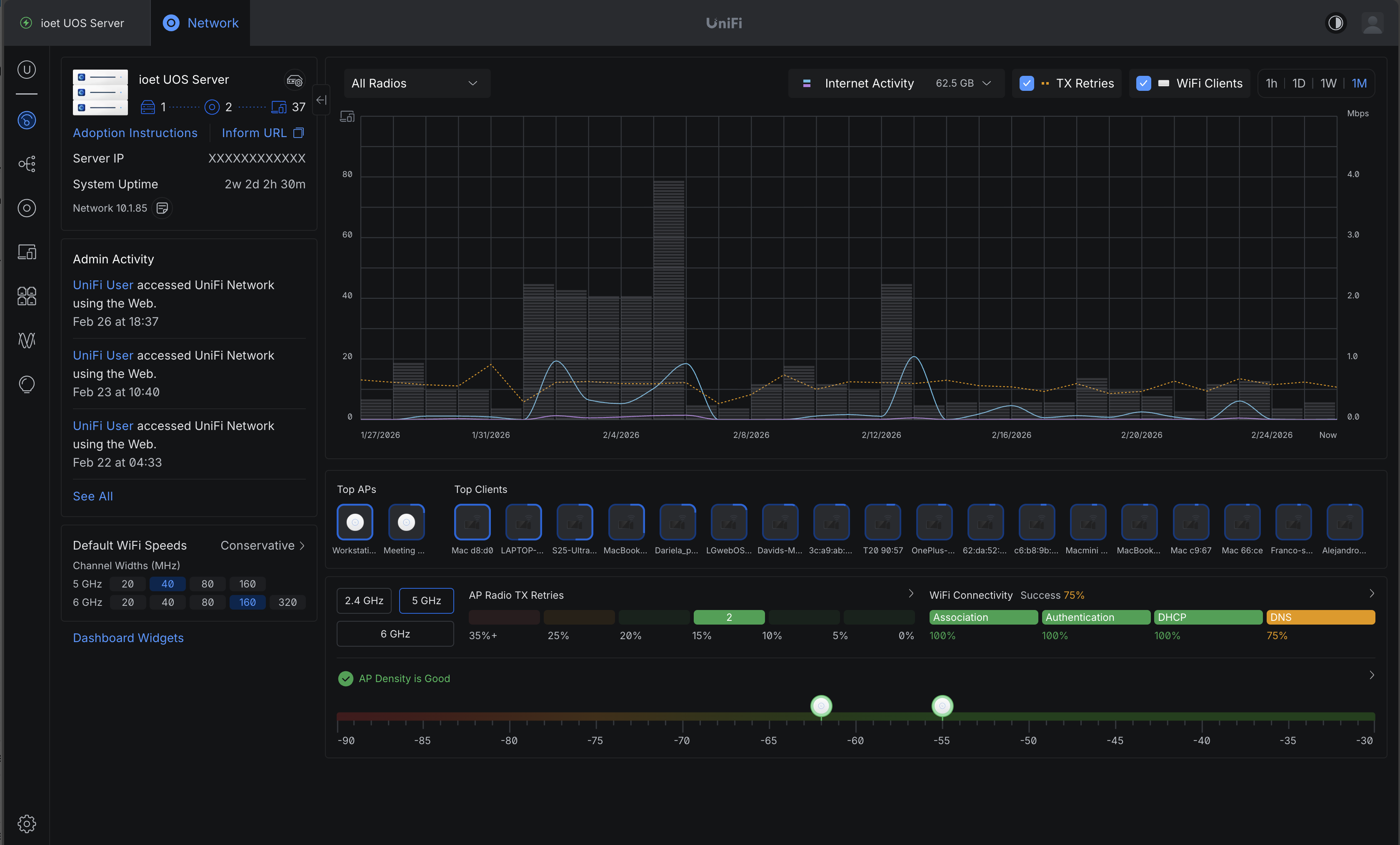
UniFi Network console — dashboard with traffic analytics, Wi-Fi clients, and AP management
unifi_console.png
~/config/vlans
$ ip link show | grep vlan

VLANs & Guest Network

LAN

Main network. Default interface for staff devices.

Guest

Internet only. Isolated from all internal networks.

IoT VLAN

Smart devices, cameras. Isolated. No cross-VLAN access.

Servers VLAN

Infrastructure servers. Restricted access, high priority.

Servers Staffed VLAN

Staff-accessible servers. Controlled cross-VLAN routing.

Unassigned Interface

Disabled. No traffic allowed. Placeholder for future use.

// before
Guest networks didn't work because our previous router and main switch had faulty VLAN management. Now they work perfectly.
~/config/wan
$ opnsense-cli gateway status

Load Balancing & Failover

  • Netlife as primary — fiber, low latency, good for real-time comms
  • Starlink as failover — satellite, higher latency, but great bandwidth
  • OPNsense handles automatic failover — if Netlife drops, traffic routes through Starlink
  • We prevented users from connecting directly to the Netlife modem's Wi-Fi
  • Actively looking for a 3rd ISP for more redundancy
Office Traffic OPNsense Load Balancer Netlife PRIMARY Starlink STANDBY Internet click: simulate failover
netlife: 120ms starlink: standby failover: armed
~/truth
$ dig everything.broken

It's Always DNS

No matter what problem you think you have, check DNS first. It's always DNS.

~/summary

Key Takeaways

wifi-ops@quito ~ %
$ read -p "Questions? " answer

Q&A

Ask anything about the setup, decisions, or networking in general.

wifi: operational lunch: generoso smash bros: still broken (NAT)
wifi-ops@quito ~ %
$ sudo raffle --pick-winner

Raffle Time!

Thank you for staying!

// prizes
Raffle for attendees — let's see who wins!
wifi: operational raffle: in_progress luck: random()